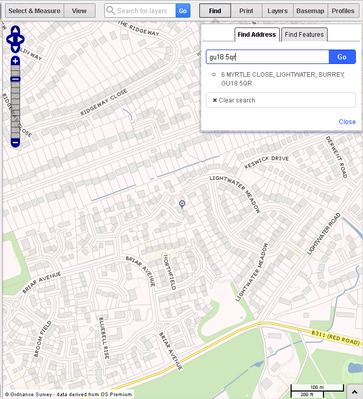
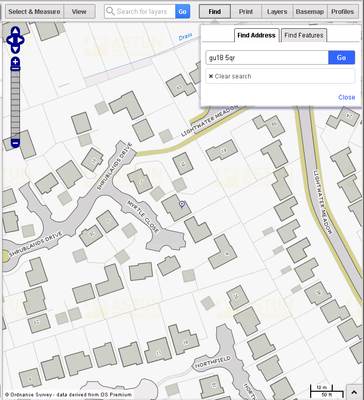
Specify map Zoom when a user performs a Find Address in iShare GIS
Overview
If you would like to change the default Zoom level used by iShare GIS when a user performs a Find Address then you may do this by editing the iShareGIS.aspx page.
Step-by-step guide
- Navigate to the D:\Astun\iShareGIS\n.n\WebApps\Web folder and open the iShareGIS.aspx page in a Text Editor such as Notepad ++.
- Search for Astun.JS.IncludeJS
Exerpt of Original code
	<script type="text/javascript" src="js/lib/prototype-1.6.0.3.js"></script>
	<script type="text/javascript" src="FileIncluderJS.aspx"></script>
	<script type="text/javascript">
		Event.observe(window, 'load', function() {
			Astun.JS.IncludeJS('gis', function() {
				window.astun.app = new Astun.JS.MapApp("#ishare-gis", "gis",
					{
						branding: "<h1><a href=\"https://astuntech.atlassian.net/wiki/x/14AgAQ\">iShare GIS</a></h1>"
					}
				);
			});
		});
	</script>
- Add the following immediately after the line Astun.JS.IncludeJS('gis', function() {
Lines to add
// Set the locationZoomWidth to a small value so that the map zooms
// in to a large scale when a user selects an address from the
// address search.
if (!window.astun.settings) {
	window.astun.settings = {};
	}
		window.astun.settings.locationZoomWidth = 100;
- Change the locationZoomWidth to the value you require, in our example we have changed it to 100.
- Your code should now look like this:
Exeprt of Code After
	<script type="text/javascript" src="js/lib/prototype-1.6.0.3.js"></script>
	<script type="text/javascript" src="FileIncluderJS.aspx"></script>
	<script type="text/javascript">
		Event.observe(window, 'load', function() {
			Astun.JS.IncludeJS('gis', function() {
			// Set the locationZoomWidth to a small value so that the map zooms
			// in to a large scale when a user selects and address from the
			// address search.
			if (!window.astun.settings) {
				window.astun.settings = {};
			}
				window.astun.settings.locationZoomWidth = 100;
				window.astun.app = new Astun.JS.MapApp("#ishare-gis", "gis",
					{
						branding: "<h1><a href=\"https://astuntech.atlassian.net/wiki/x/14AgAQ\">iShare GIS</a></h1>"
					}
				);
			});
		});
	</script>
- Save your changes and Refresh the map in iShare GIS.
| Before change | After change |
|---|---|
|
|
| Default Zoom | Zoom Width 100 |