/
Granting / Removing Roles on Users V1.5
Granting / Removing Roles on Users V1.5
- Kim Stimpson
- Antony Scott (Deactivated)
Owned by Kim Stimpson
- Run pgAdmin III
- Expand the Server details for the SDW server and login using a superuser or administrator account.
- Expand the Login Roles to show the entries.
- Right-click on the user you have just created and select Properties.
- Select the Role membership tab.
- Select the relevant role in the Not Member box and click >> to add to the Member box. For restricted read-only access a user requires the restricted schema viewer role. For read/write access a user requires the restricted schema editor role.
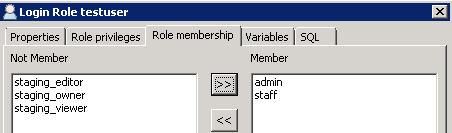
- Click OK.
, multiple selections available,
Related content
Assigning Access Rights to a Private Schema V1.5
Assigning Access Rights to a Private Schema V1.5
More like this
Creating an Admin User v2.0
Creating an Admin User v2.0
More like this
Restricting a Schema in the SDW V1.5
Restricting a Schema in the SDW V1.5
Read with this
Granting / Removing Roles on Users v2.0
Granting / Removing Roles on Users v2.0
More like this
Creating a User table V1.5
Creating a User table V1.5
Read with this
Assigning Access Rights to a Private Schema v2.0
Assigning Access Rights to a Private Schema v2.0
More like this