/
Configure an Internal Function Datasource
Configure an Internal Function Datasource
By Kim Stimpson
31 May, 2018
When you select to create a Data Source type of Internal Function you will see the following dialog:
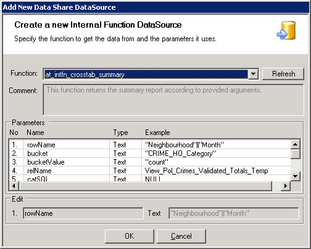
Click on the Refresh button to return a list of existing functions in the PostgreSQL database. You may then select one from the list taking care to pick a function that does actually return a dataset. You may also specify a list of parameters.
Once you click OK you will be able to configure the General Data Share Connection Details.
, multiple selections available,
Related content
Configure an Internal Datasource
Configure an Internal Datasource
More like this
Configure an Internal Command Datasource
Configure an Internal Command Datasource
More like this
Configure a Standard Datasource
Configure a Standard Datasource
More like this
Configure an Internal Merged Datasource
Configure an Internal Merged Datasource
More like this
Adding a new Datasource
Adding a new Datasource
More like this
Data Share Configuration
Data Share Configuration
More like this